Calculating
Active Players
DISCORD'S LIVING WORLD LAYER
Give your server a reason to return. Aurix turns everyday Discord activity into shared quests, rivalries, status, and stories your members build together.
Live Community Signal
Members get a world to belong to, not another dashboard to learn. Add Aurix, use /start, and let the story grow from the conversations you already have.
Why Aurix
Aurix gives your community lightweight progression, visible status, and just enough risk to turn ordinary chat into memorable moments.
Profiles, relics, memories, factions, and server projects give members reasons to care about what happened, not just what they earned.
PvP, robbery, bounties, heists, and faction protection create danger with strategy, revenge arcs, and recoverable setbacks.
Server admins can tune role shops, events, rewards, and sinks so each community has its own economy and identity.
Command Docs
Search across 72 commands by name, category, or purpose. Subcommands use pipes.
Discover evolving artifacts with ownership history, server announcements, and dangerous world effects.
Check the living server state, active faction pressure, economy weather, and event hooks.
Plan strategic theft with protection, risk, notoriety, and revenge opportunities.
Place, track, and resolve player bounties that turn rivalries into public stories.
Join faction politics, build identity, protect members, and compete for territory influence.
Coordinate high-risk group operations with roles, contribution rewards, and social fallout.
Browse unstable underground offers shaped by heat, scarcity, and server economy pressure.
Contribute to server-wide builds that unlock shared rewards and a stronger community identity.
Express status, style, titles, and profile flavor without turning premium into pay-to-win.
View and purchase server roles configured by admins.
No commands match that search.
Public Rankings
Give every server a shareable ranking page with aura standings, PvP momentum, faction movement, relic owners, and seasonal identity.
Public server pages make faction identity, rare achievements, and rival momentum visible outside Discord.
View Public RankingsAdd Aurix to your Discord server first so members can create profiles and start earning aura.
Add Bot to Your ServerUse /start to create your profile, then join events, factions, projects, and relic hunts.
Compete, cooperate, collect cosmetics, earn titles, and make your faction known.
Unlock badges, profile status, relic history, server memories, and cosmetic prestige.
Store
All Aurix points, virtual items, ranks, and progression are virtual bot features only. They have no cash value, cannot be traded, and cannot be exchanged for money, prizes, or physical goods. Aurix does not offer gambling, betting, sweepstakes, or real-money rewards.
Payments are processed by Paddle as reseller and merchant of record. Product support is provided by Aurix Bot at zxavokaurix@gmail.com.
Login with Discord before buying so global premium can be linked to your user account.
Global User Premium
Delivered digitally to the Discord user account connected at checkout, not locked to one server.
Global User Premium
Own premium for the long run.
Pays for itself in just 10 months.
Delivered digitally to the Discord user account connected at checkout, not locked to one server.
Premium is linked to the Discord account used at checkout. Server-specific setup can be changed from the dashboard when you manage that server.
Refund requests are reviewed under the refund policy for duplicate charges, billing mistakes, or undelivered digital access.
Benefits are delivered digitally to the connected Discord account after Paddle confirms checkout.
One-Time Drops
Pick up optional digital packs for the Aurix Discord bot. Packs focus on cosmetics, modest capped aura, collectibles, and utility items without paid PvP dominance.
Login with Discord first so packs deliver to the right account.
All packs are optional gameplay convenience items. They do not grant cash value, real-money rewards, withdrawals, gambling entries, prizes, physical goods, cryptocurrency, gift cards, or stored value.
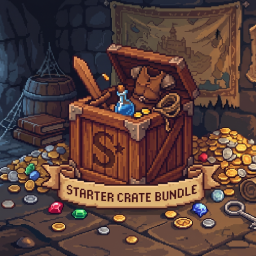
Best for new profiles that want early style without skipping the game.
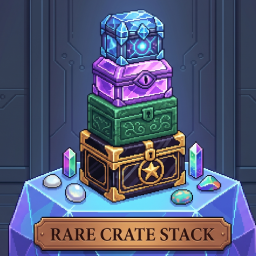
A focused style pack for players who want their profile to stand out.
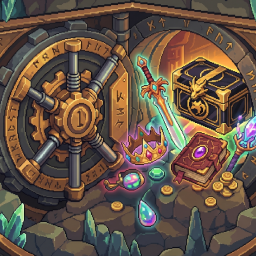
A prestige-focused drop for collectors, flex culture, and profile identity.
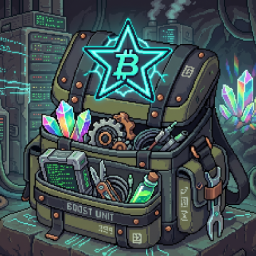
Convenience supplies for active sessions without removing risk or counterplay.
Server Dashboard
Admins can list Discord server roles for players to buy with aura. Players buy them in Discord with /roleshop list and /roleshop buy.
Aurix can only assign roles below the bot's highest role and needs the Manage Roles permission in your server.
Your manageable Discord servers will appear here.
Choose a server from the dropdown above to view, create, and manage its role shop listings.
Player Feedback
"Aurix gave our server rivalries, relic flexes, and moments people actually talked about the next day."
"The faction drama and shared projects made our community feel alive without turning chat into command spam."
Use the /start command in a Discord server where Aurix is active. This creates your bot profile and starts tracking virtual progression.
Yes. Use the Add Bot to Your Server button and authorize Aurix for your server.
Higher ranks can unlock badges, profile status, cosmetics, and identity perks. These are virtual bot features only and have no cash value.
Yes, Aurix has free core features. Premium adds cosmetics, profile status, convenience, reminders, and modest capped boosts without paid PvP dominance.
Join the official Discord server and use the suggestions or bug-report channels.
Find launch updates and community channels after you have added the bot.
Aurix Bot is operated as a sole proprietor brand by Anju Sharma.
zxavokaurix@gmail.comLast updated: May 10, 2026. These cards open the full document-style policies with left-side navigation for payment processor review and long-form legal text.
Rules for using Aurix, paid digital products, acceptable use, virtual rewards, and service availability.
Read TermsHow Aurix handles Discord IDs, gameplay data, support messages, logs, data requests, and security.
Read PrivacyRefund eligibility for duplicate charges, delivery issues, unused purchases, and how to request support.
Read Refunds